

Timer can only go on field app pages (Page 1, 2, 3…), not on the Initial page, and only once per page.
- Time on site: how long a technician spends at a customer.
- Time per step: how long each page of the task takes.
- Performance checks: compare durations across workers or visits.
- Service levels: check that an activity stays within its time limit.
Properties
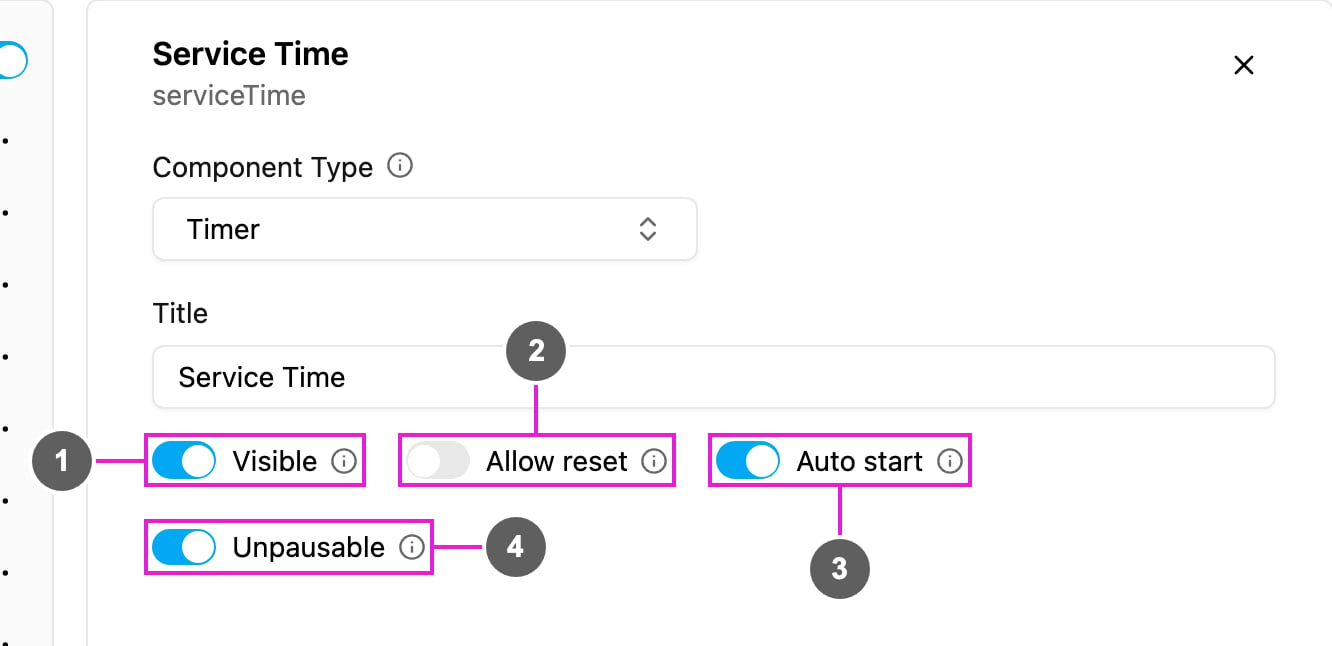
- Visible: when off, the timer is hidden on the field app; its time is still kept and exported.
- Allow reset: show a reset button so the worker can clear the time and start over.
- Auto start: the timer starts by itself when the worker opens the page. When off, the worker taps start.
- Unpausable: once started, the timer cannot be paused. Use it for continuous, audit-grade measurements.
How to set it up
1
Add it to a field app page
Open a field app page, click Add component and choose Timer. Write a Title, such as Service Time.
2
Choose how it starts
Turn Auto start on if the activity begins as soon as the worker reaches the page; leave it off if they should tap start.
3
Choose the controls
Turn on Allow reset to let the worker restart. Turn on Unpausable if pausing must not be possible.
On the field app
The timer shows the title and00:00:00 with a start button. With Auto start it starts counting at once. The worker can pause it unless Unpausable is on, and reset it if Allow reset is on. The total time is saved when the task is finished.
See the preview on the Capture page, where Service Time is running.