

Required permission:
- View result
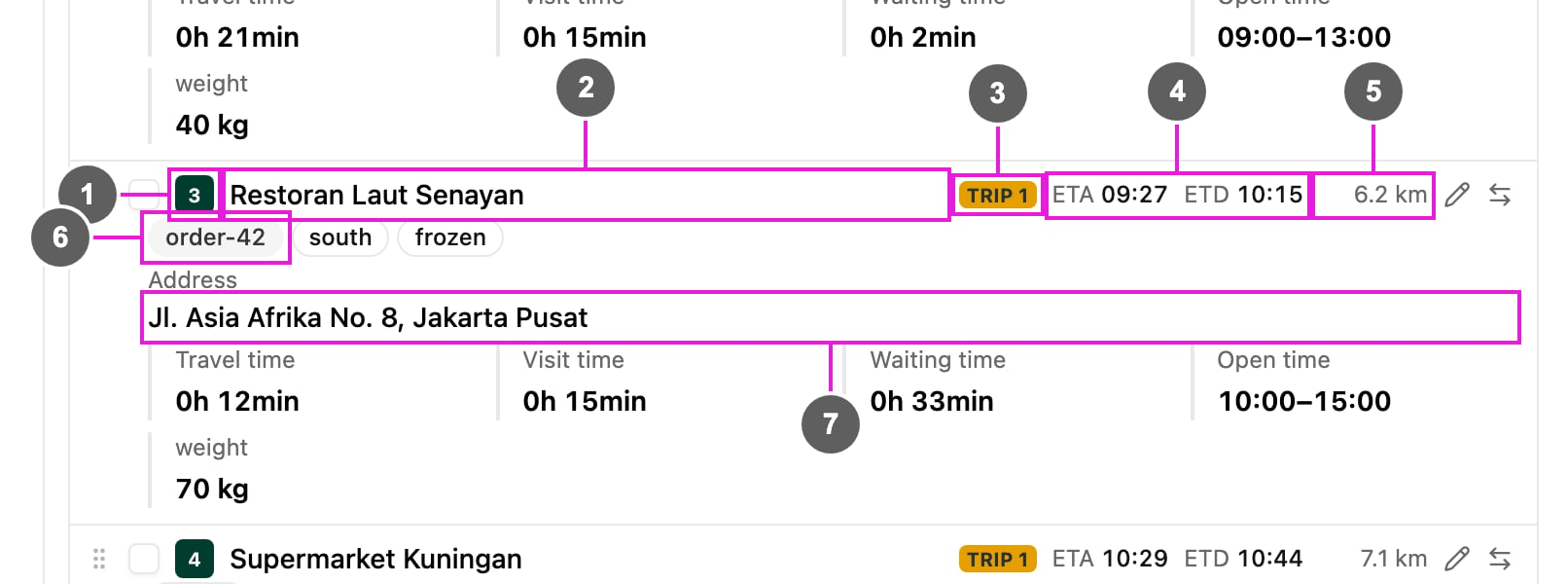
- Order: the visit’s position in the vehicle’s route.
- Visit name: the name of the visit.
- Trip: the trip the visit belongs to, for example TRIP 1. A vehicle has several trips with Multi Trip.
- ETA and ETD: the estimated time of arrival and of departure, for example ETA 09:27 ETD 10:15.
- Distance: from the previous visit, or from the hub for the first visit.
- Tags: the visit tags. The visit group and the split number also show here as badges.
- Address: the full address of the visit.
- Travel time: time driving to the visit.
- Visit time: time spent at the visit.
- Waiting time: time waiting before the visit can start, worked out from the ETA and the visit’s open time.
- Open time: when the visit can be served, from opening to closing time.
- Capacity: the visit’s load for each capacity constraint, for example weight 70 kg.