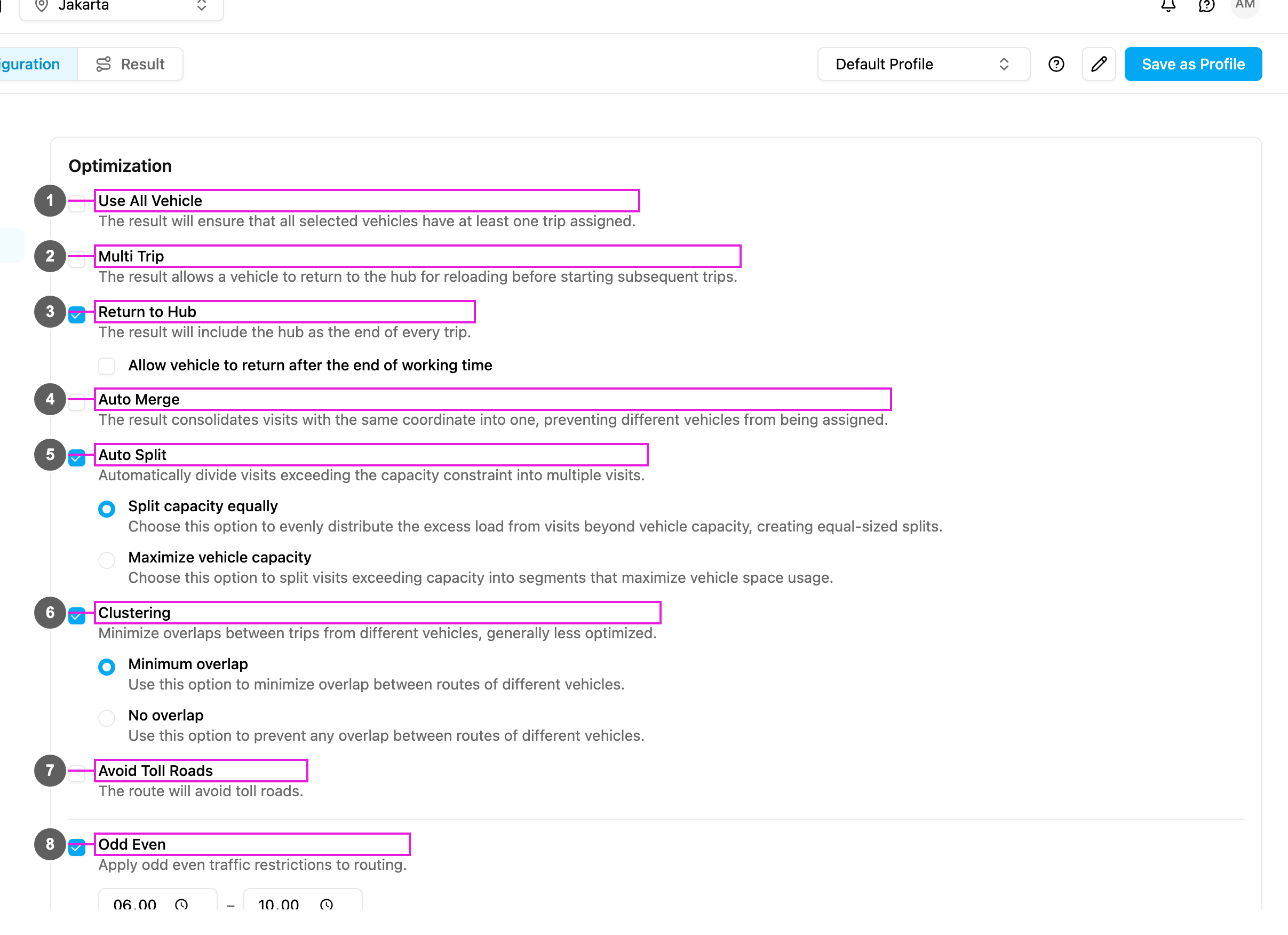
With Auto Merge on, visits with exactly the same coordinate are given to the same vehicle, one right after another. Without it, the optimization may split the orders of one customer over different vehicles.
Required permission:
- View configuration
- Edit configuration
Turning it on
- Open Planning › Routing › Configuration and go to Optimization.
- Tick Auto Merge (item 4 in the picture).
The change is saved as soon as you make it.
From then on, visits with identical coordinates are no longer given to different vehicles.
Example: the visits “Toko Sinar Jaya” and “Toko Sinar Jaya – Gudang” both have the coordinate -6.153812,106.817402. With Auto Merge they are served by the same vehicle, one after the other.
Auto Merge does not combine the visits into one task. Each visit stays a separate visit and task; they are only kept together on one vehicle.
With Auto Split
When Auto Split is also on, visits with identical coordinates are not split across different vehicles, so merged visits stay together.