

latitude, longitude, from the device GPS, from the map or typed in. It is the main component for location-based work: route planning, checking that a worker is at the right place, and showing tasks on the map.
In the previous version this type was called Geolocation.
- Delivery location: the customer’s position on the Initial page, for route planning and a proof-of-delivery check.
- Site check-in: prove the technician reached the right place.
- Import with addresses only: let the coordinate be found from the address.
Properties
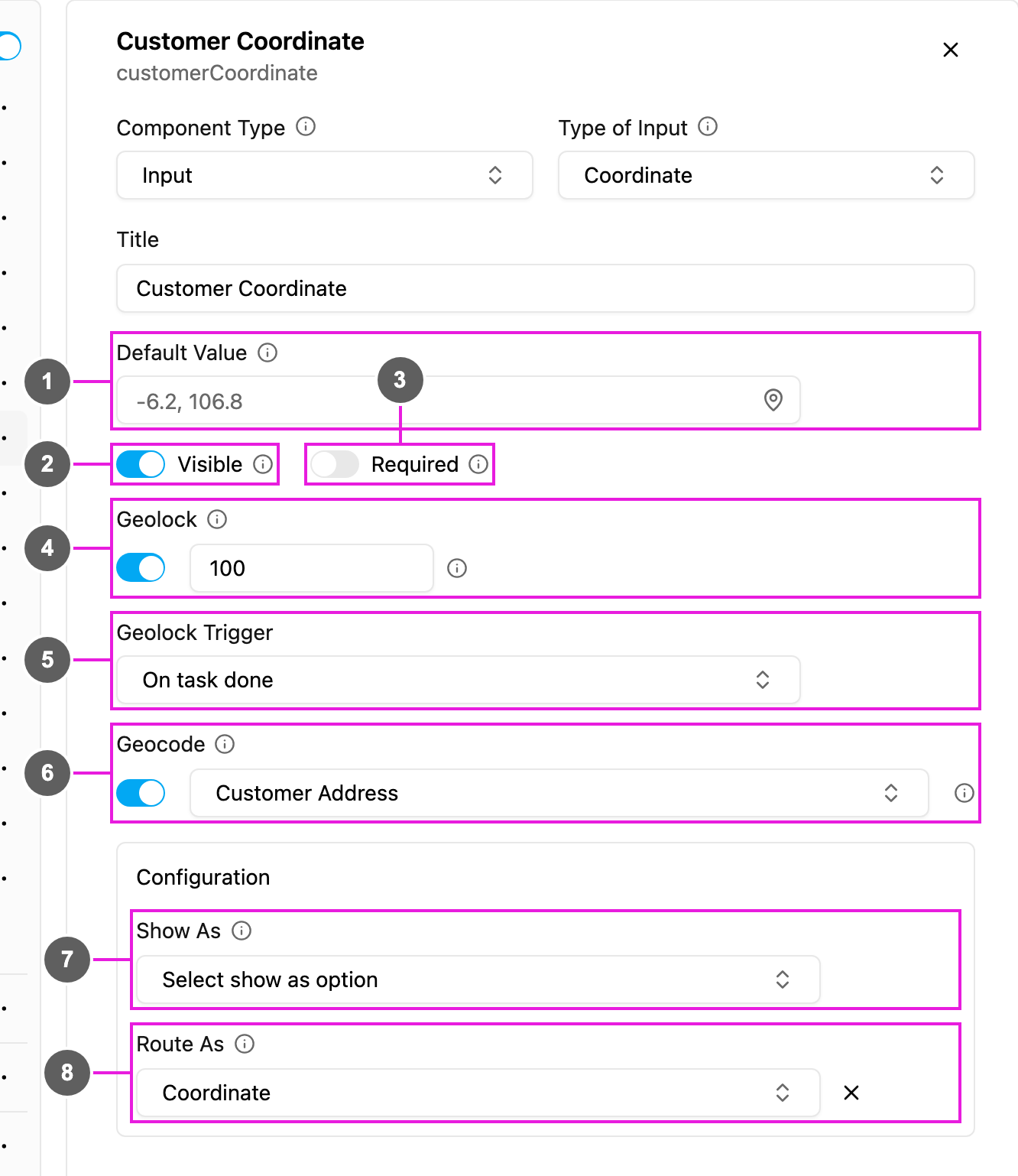
- Default Value: a coordinate filled in for every new task, for example
-6.2, 106.8. Click the pin to pick it on a map. - Visible: when off, the field is hidden on the web and the field app; its value is still kept and exported.
- Required: the task cannot be saved or finished until a coordinate is set.
- Geolock: when on, the task can only be started or finished within the Radius (Meter) of this coordinate. The radius is required while Geolock is on and must be 0 or more. Geolock is checked on the field app only.
- Geolock Trigger: when the check happens: On task start or On task done. Each trigger can be used by one coordinate per flow.
- Geocode: when on, pick the Address component the coordinate is found from. The list shows the flow’s Address inputs.
- Show As: show the coordinate in the task list as the task’s Title, Content or Label.
- Route As (Initial page only): pass the coordinate to route planning as the visit’s Coordinate.
Geolock and Geocode
Rules
- Radius is required, and 0 or more, while Geolock is on.
- Geolock Trigger is required while Geolock is on.
- A flow can have one coordinate with On task start and one with On task done. Picking a trigger another coordinate already uses is refused.
- Geocode needs an Address component. If the list is empty, add an Address input first.
- To go the other way, filling an address from this coordinate, turn on Georeverse on the Address component instead.
- Inside a Subpage, a coordinate keeps the map picker but has no Geolock.
On the field app
The field showslatitude, longitude with a map picker. The worker uses their current position or picks a point on the map. With Geolock on, starting or finishing the task (per the trigger) outside the radius is blocked with a message.