

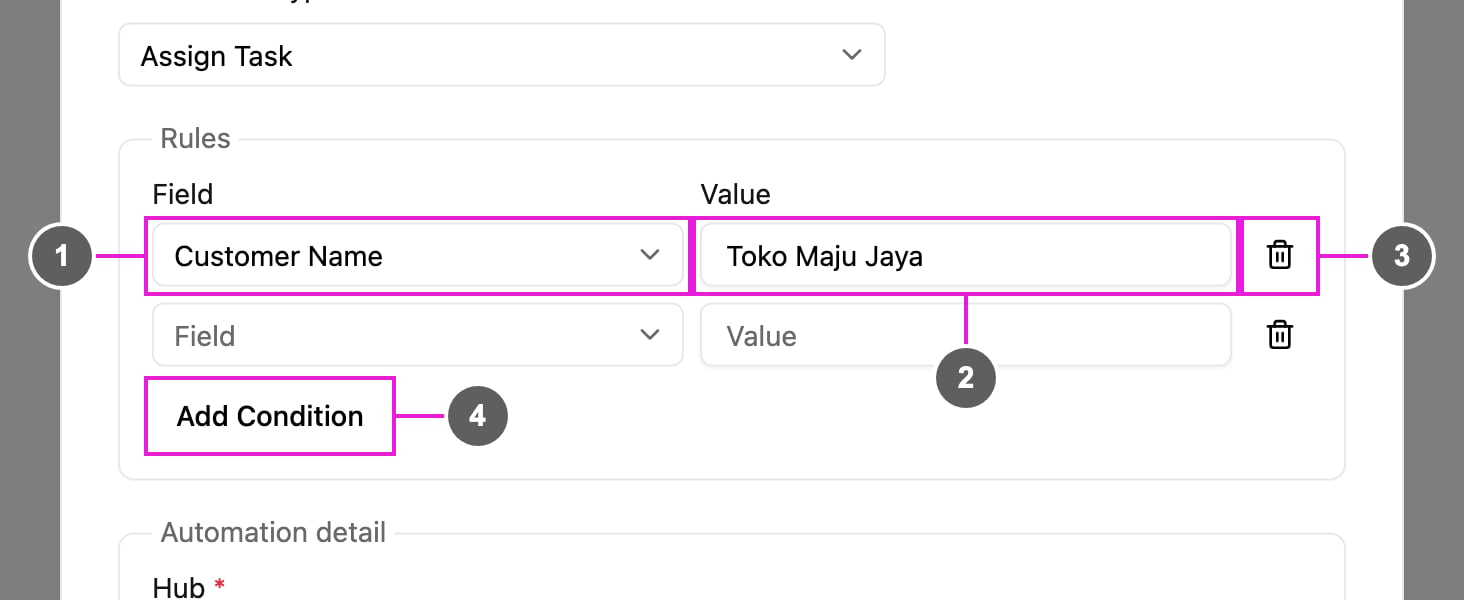
- Field: a field of the task type chosen in Task Type (or of the data type chosen in Trigger Data Type). The list shows the fields by their titles, for example Customer Name.
- Value: the value the field must have. The automation runs only when the record’s value for that field matches what you type. In the example, the automation runs only for Delivery tasks whose Customer Name is Toko Maju Jaya.
- Remove condition (trash icon): delete this condition.
- Add Condition: add another field and value. When there are several conditions, all of them must match.
Example
You want to assign VIP deliveries to one driver automatically:
Every new Delivery task for Toko Maju Jaya is assigned at once. Deliveries for other customers are left alone.
Geofence automations have no rules. Their only scope is the Geofence Group.