> ## Documentation Index
> Fetch the complete documentation index at: https://docsv4.mile.app/llms.txt
> Use this file to discover all available pages before exploring further.
# Templates
> Start a task type from a ready-made template, and what each default template contains.
A **template** is a ready-made task type you can copy and then change to fit your work. Templates are grouped by industry, and every organization can use them.
Required permission:
* View flow
* Create flow
Templates are the best way to start if you are new. Before you use one, check its pages and components and adjust them to your own process.
## Create a task type from a template
1. Open **Workflow › Task Type**.
2. Click the arrow beside **New** and choose **From a template**.
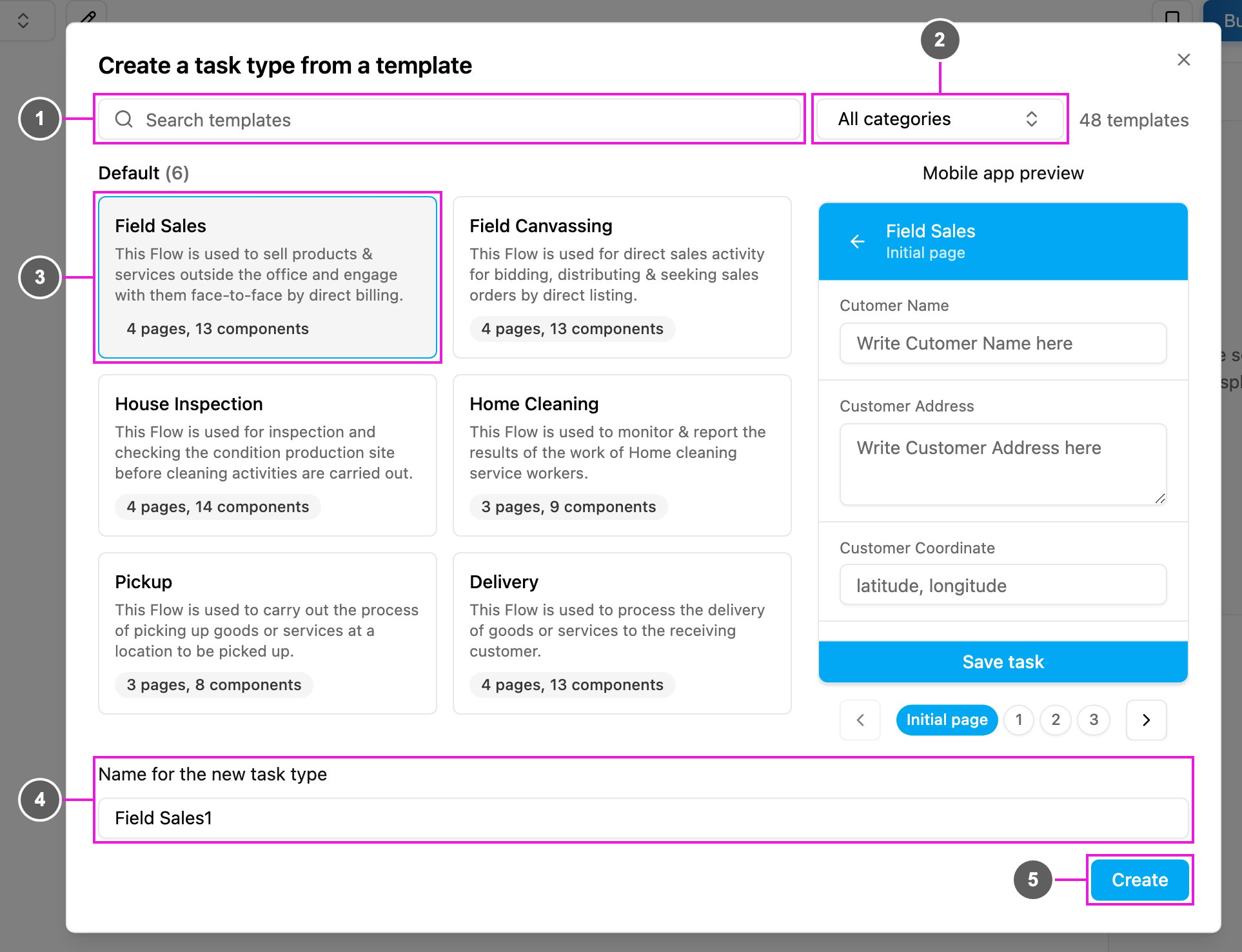
3. Pick a template, check the name and click **Create**.
1. **Search templates**: find a template by its name or description.
2. **Category**: show the templates of one category, such as *Default*, *Retail* or *Transport and Logistics*, or **All categories**. The count beside it shows how many templates are listed.
3. **Template card**: the template's name, what it is for, and how many pages and components it has. Click a card to pick it. Hover over a card to see it in the **Mobile app preview** on the right, and use the page buttons under the preview to look through its pages.
4. **Name for the new task type**: filled in from the template's name with a number added, such as *Field Sales1*. Change it if you like. The [name rules](/pages/workflow/task-type/managing-task-types#create-a-task-type) apply.
5. **Create**: create the task type and open it in the builder.
The new task type is a full copy: pages, components and configuration. Changing it later does not change the template.
A template with more components than your plan allows cannot be used. The dialog says **This template has more components than your plan allows**. Pick a smaller template or upgrade your plan. See [Limits per plan](/pages/workflow/task-type/introduction#limits-per-plan).
## Default templates
The **Default** category holds the six task types most field teams start with. New organizations also get them as ready-to-use task types when they sign up.
### Pickup
Picks up goods from a location. The courier opens the task, goes to the requester, takes proof of pickup and closes the task.
* **Initial page**: Requester Name, Requester Address, Pickup Coordinate.
* **Page 1**: a read-only summary of the requester for the courier.
* **Page 2**: Pickup Picture (photo) and Signature.
**Best for**: logistics, courier services, warehouse pickup, e-commerce return pickups.
### Delivery
Delivers goods to a customer, including cash-on-delivery payment and proof of delivery. Supports both a **Success** and a **Failed** delivery, with fields that appear only when needed.
* **Initial page**: Customer Name, Customer Address, Customer Coordinate and Order Price (a Bill with items and costs).
* **Page 1**: Confirm Payment (COD or NON COD) and Delivery Status (Success or Failed). If Failed, a Reason field appears.
* **Page 2**: the final Order Price (Bill).
* **Page 3**: Receiver Name, Proof Of Delivery (photo) and Signature.
**Best for**: e-commerce delivery, food delivery, retail distribution, parcel couriers.
### Field Sales
For sales agents who visit customers and sell on the spot, with billing and payment captured during the visit.
* **Initial page**: Customer Name, Address, Coordinate and Bill Item (products and prices).
* **Page 1**: Sales Status (Success to Buy or Failed to Buy), which decides the next pages.
* **Page 2**: Bill Item, to confirm the quantity and price.
* **Page 3**: Payment Method (Cash, Credit Card, QRIS and so on), Proof of Sales (photo), Signature and an optional Note.
**Best for**: FMCG sales, direct-to-store sales, B2B field sales, distributor agents.
### Field Canvassing
For agents who visit prospects to take orders and survey demand. Like Field Sales, but built around an item **List** instead of a Bill, so it suits order-taking without payment on the spot.
* **Initial page**: Customer Name, Address, Coordinate and List Item (a quantity per item).
* **Page 1**: Status Canvassing (Success to Order or Failed to Order).
* **Page 2**: List Item, to confirm the order.
* **Page 3**: Payment Method, Proof of Canvassing (photo), Signature and an optional Note.
**Best for**: distributor canvassing, market surveys, B2B order taking, route-to-market sales.
### Home Cleaning
For home or office cleaning crews, to record what was done and where.
* **Initial page**: Customer Name, Customer Address, Customer Coordinate.
* **Page 1**: read-only customer details and an Additional Service choice (Air Freshener, Disinfectant, Deep Cleaning and so on).
* **Page 2**: Room Photo (after cleaning) and Signature.
**Best for**: home cleaning, office cleaning, maintenance crews, facility management.
### House Inspection
Inspects a property before a cleaning or service job, capturing the area, the number of floors and photos of the condition so the team can plan the work.
* **Initial page**: Customer Name, Address, Coordinate.
* **Page 1**: read-only customer details.
* **Page 2**: Building Area (m²), Number of Floors, Area Cleaning option and Current Building Conditions (photos).
* **Page 3**: Total Workers, Tools Used (multiple choice), Signature and an optional Note.
**Best for**: inspection services, pre-cleaning surveys, property assessment, maintenance pre-checks.
## Related
* [Managing Task Types](/pages/workflow/task-type/managing-task-types)
* [Build with AI](/pages/workflow/task-type/build-with-ai)
* [Task Type Builder](/pages/workflow/task-type/builder)
This documentation is built and hosted on [Mintlify](https://mintlify.com), a developer documentation platform.