> ## Documentation Index
> Fetch the complete documentation index at: https://docsv4.mile.app/llms.txt
> Use this file to discover all available pages before exploring further.
# Timer
> Measure how long a step of the task takes, with a stopwatch on the field app.
**Timer** is a stopwatch on a field app page. It measures how long the field worker spends on a step, and saves the time on the task.
Timer can only go on field app pages (Page 1, 2, 3…), not on the Initial page, and only once per page.
**Use cases**
* **Time on site**: how long a technician spends at a customer.
* **Time per step**: how long each page of the task takes.
* **Performance checks**: compare durations across workers or visits.
* **Service levels**: check that an activity stays within its time limit.
## Properties
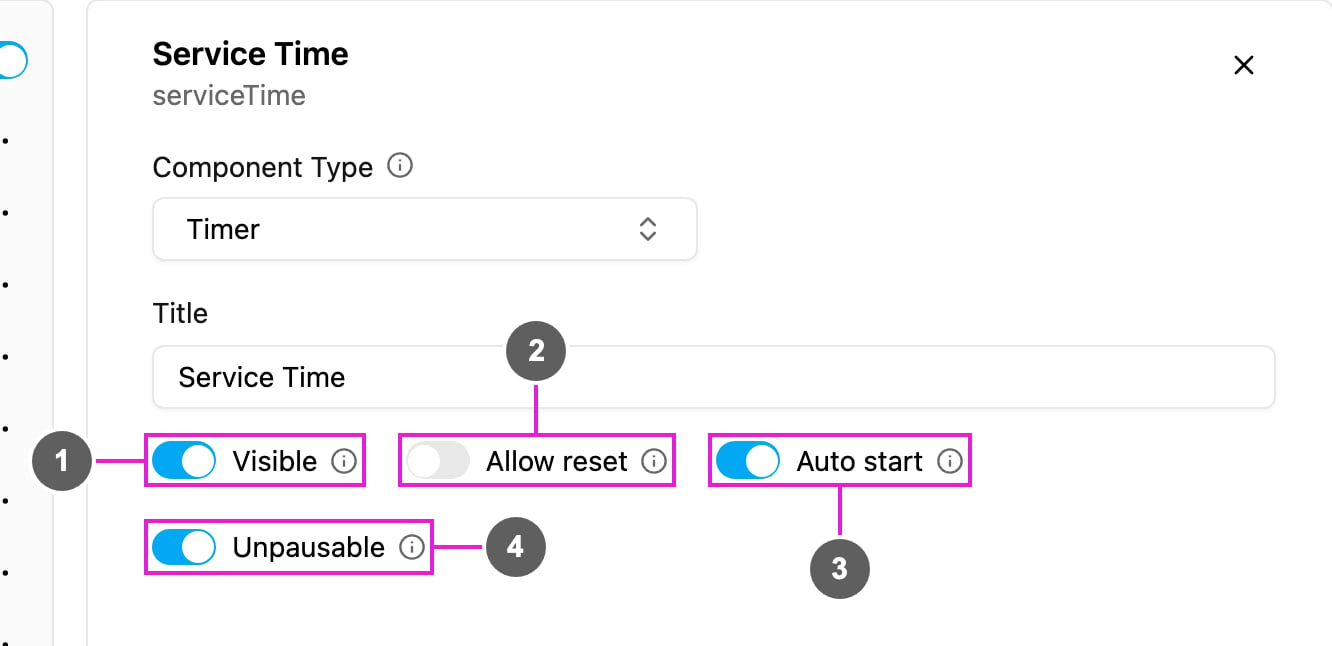
1. **Visible**: when off, the timer is hidden on the field app; its time is still kept and exported.
2. **Allow reset**: show a reset button so the worker can clear the time and start over.
3. **Auto start**: the timer starts by itself when the worker opens the page. When off, the worker taps start.
4. **Unpausable**: once started, the timer cannot be paused. Use it for continuous, audit-grade measurements.
Timer has no Required switch.
## How to set it up
Open a field app page, click **Add component** and choose **Timer**. Write a **Title**, such as *Service Time*.
Turn **Auto start** on if the activity begins as soon as the worker reaches the page; leave it off if they should tap start.
Turn on **Allow reset** to let the worker restart. Turn on **Unpausable** if pausing must not be possible.
## On the field app
The timer shows the title and `00:00:00` with a start button. With **Auto start** it starts counting at once. The worker can pause it unless **Unpausable** is on, and reset it if **Allow reset** is on. The total time is saved when the task is finished.
See the preview on the [Capture](/pages/workflow/task-type/components/capture) page, where *Service Time* is running.
This documentation is built and hosted on [Mintlify](https://mintlify.com), a developer documentation platform.