> ## Documentation Index
> Fetch the complete documentation index at: https://docsv4.mile.app/llms.txt
> Use this file to discover all available pages before exploring further.
# On Data Source Created
> Run an automation when a new record is added to a data source of the chosen data type.
**On Data Source Created** runs when a new record is added to a [data source](/pages/workflow/data-source/introduction) of the chosen data type. Use it to turn incoming data into tasks, or to pass new records on to another system.
Required permission:
* View automation
* Create automation
* View data source
## When it runs
The event runs when a record is created by any of these:
* **Web app**: a user adds the record on the Data Source page.
* **Import**: records uploaded from a spreadsheet.
* **API**: records created through the API.
* **External data source**: records synced from an integrated external system.
It runs only when the record is saved, belongs to the data type chosen in **Trigger Data Type**, and matches every [rule](/pages/workflow/automation/rules).
## Set it up
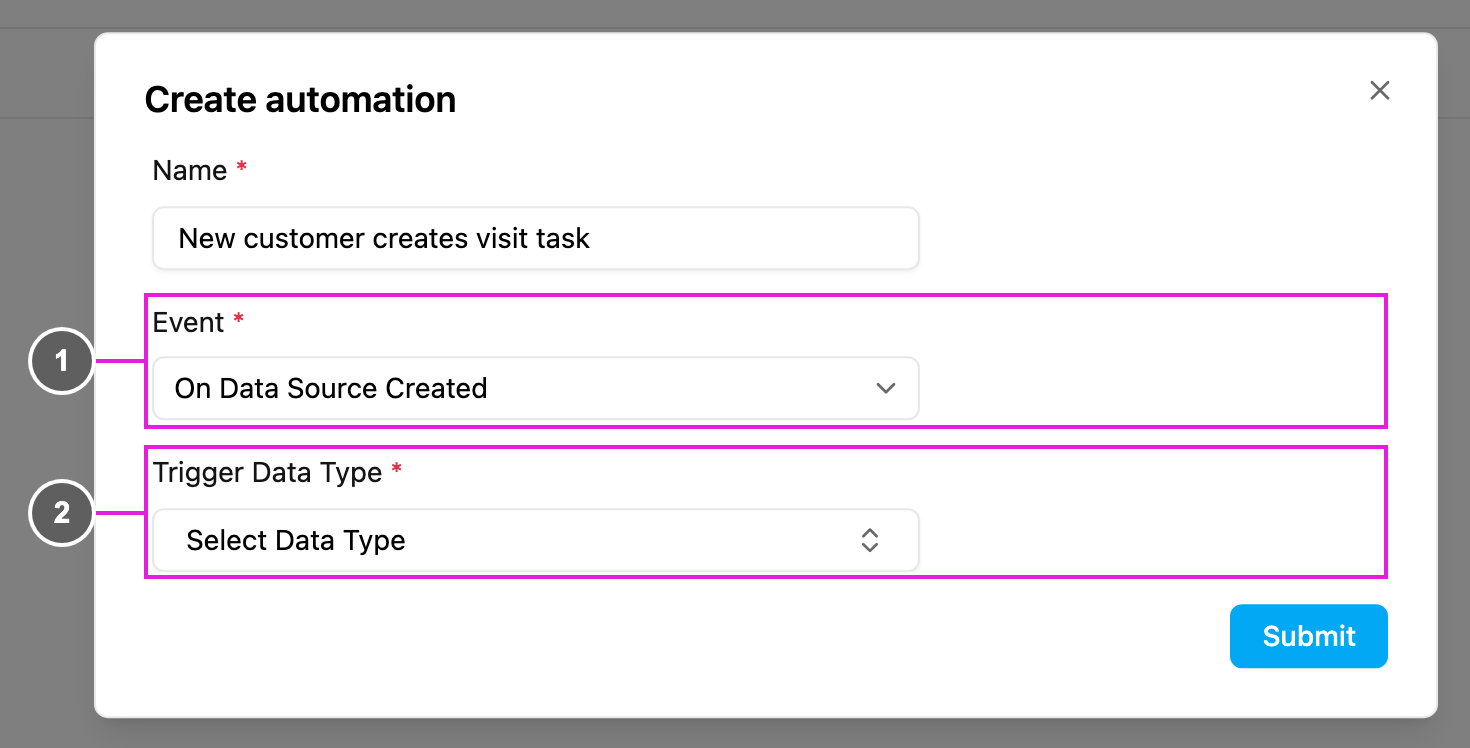
On **Workflow › Automation**, click **New**.
1. **Event**: **On Data Source Created**.
2. **Trigger Data Type**: required. The data type whose new records start the automation, for example **Customer Orders**.
Then choose the **Automation Type**:
* [Create Task](/pages/workflow/automation/actions/create-task): pick the task type to create and map the record's fields to the task's fields, for example
| Record field | Task field |
| - | - |
| Customer Name | Customer Name |
| Customer Phone | Phone |
| Customer Address | Address |
| Order Number | Order ID |
Fields not in the record can be given fixed values.
* [Webhook](/pages/workflow/automation/actions/webhook): send the record to a URL, for example `https://api.example.com/data/created` with an `Authorization` header.
Optionally add **Rules** on the record's fields, click **Submit**, make sure the automation is **Active**, and add a record to test it.
## Use cases
| Scenario | Trigger Data Type | Automation Type | Result |
| - | - | - | - |
| Orders become deliveries | Customer Orders | Create Task | Each new order creates a Delivery task with the order's customer, address, phone and items. |
| Leads become visits | Sales Leads | Create Task | Each new lead creates a Customer Visit task. |
| Sync inventory | Product Inventory | Webhook | New records are sent to a warehouse system. |
## Webhook payload
An example request body:
```json theme={null}
{
"event": "on_data_source_created",
"timestamp": "2024-01-15T09:00:00.000Z",
"dataSource": { "id": "datasource_id_123", "name": "Customer Orders", "typeId": "datatype_id_456" },
"entry": {
"id": "entry_id_789",
"createdAt": "2024-01-15T09:00:00.000Z",
"fields": {
"orderNumber": "ORD-2024-001",
"customerName": "Budi Santoso",
"customerPhone": "+6281234567890",
"customerAddress": "Jl. Sudirman No. 123, Jakarta",
"deliveryCoordinate": "-6.2088,106.8456",
"orderItems": [
{ "productCode": "PROD-001", "productName": "Product A", "quantity": 2, "price": 50000 }
],
"totalAmount": 100000,
"paymentType": "COD",
"notes": "Handle with care"
}
},
"hub": { "id": "hub_id_789", "name": "Jakarta Hub" },
"creator": { "id": "user_id_101", "name": "Operations Manager", "email": "ops@example.com" },
"createdFrom": "WEB"
}
```
`entry.fields` follows the fields of your data type.
## Troubleshooting
**The automation doesn't run when records are created.**
* Check that its **Active** switch is on and the record's data type matches **Trigger Data Type**.
* Check that the rules don't exclude the record, and that the record was saved.
**Created tasks have missing or wrong values.**
* Review the field mapping. Empty record fields give empty task fields.
* Give required task fields a fixed value when the record may not have them.
**The automation runs several times for one record.**
* Look for several active automations on the same data type. The event runs on new records only, not on updates.
* Make your webhook endpoint idempotent, using the record ID.
This documentation is built and hosted on [Mintlify](https://mintlify.com), a developer documentation platform.