> ## Documentation Index
> Fetch the complete documentation index at: https://docsv4.mile.app/llms.txt
> Use this file to discover all available pages before exploring further.
# WhatsApp
> Send an automatic WhatsApp message to a phone number on the task.
The **WhatsApp** channel of the [Notification](/pages/workflow/automation/actions/notification) action sends a WhatsApp message to a phone number stored on the task. It's available for **On Task Created**, **On Task Assigned** and **On Task Finished**.
Required permission:
* View automation
* Create automation
## Set it up
Choose **Automation Type** › **Notification**. WhatsApp is the default channel.
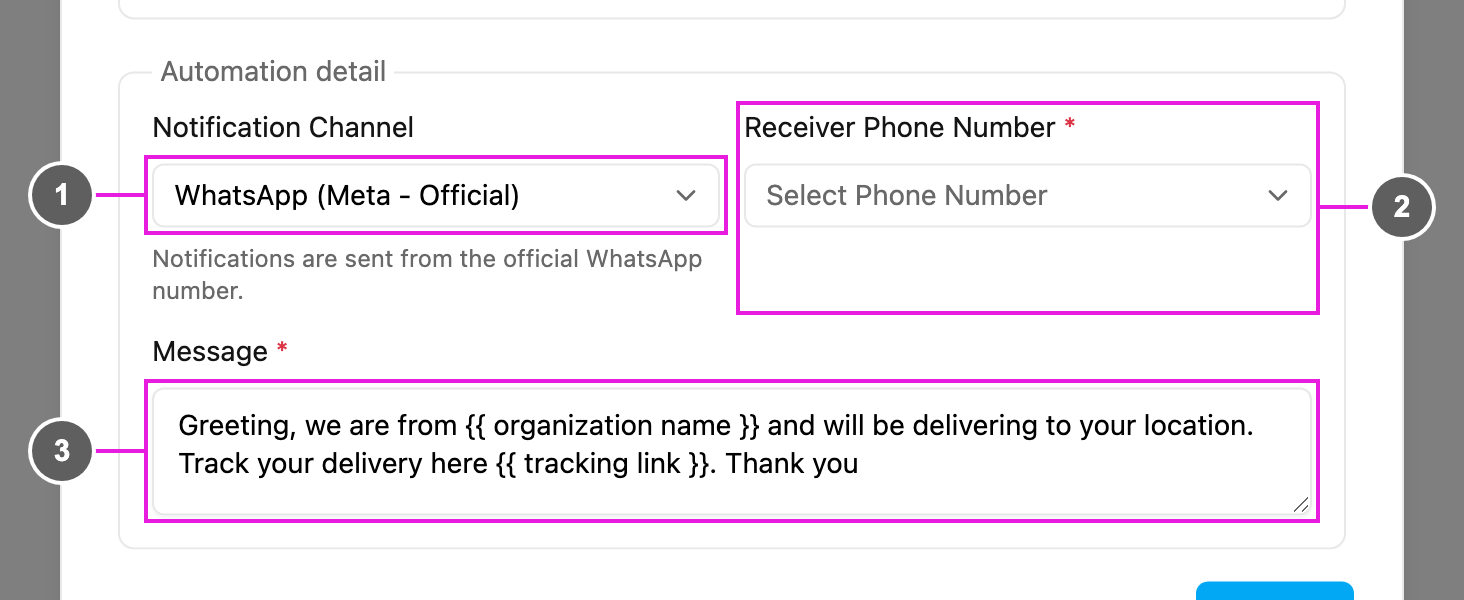
1. **Notification Channel**: **WhatsApp (Meta - Official)**. The note under it says messages are sent from the official WhatsApp number. Accounts without the official sender see **WhatsApp (Fonnte)** instead; see [Fonnte](#whatsapp-fonnte).
2. **Receiver Phone Number**: required. The field of the task type that holds the recipient's phone number, for example the customer's phone. The task's value for that field is where the message goes.
3. **Message**: required. The text to send, prefilled with the default message. Use `{{ organization name }}` and `{{ tracking link }}` to insert your organization's name and the task's tracking link.
Click **Submit** and make sure the automation is **Active**.
## WhatsApp (Fonnte)
Accounts without the official WhatsApp sender send through **Fonnte**, a third-party WhatsApp service. With **WhatsApp (Fonnte)** selected, an extra required field appears:
* **API Key**: your Fonnte API key. Connect your WhatsApp number to Fonnte first; Fonnte then gives you the key. Fonnte is a paid service, so you need an active Fonnte subscription.
Keep the API key private.
## Example
| Setting | Value |
| - | - |
| Event | On Task Assigned |
| Task Type | Delivery |
| Receiver Phone Number | Customer Phone |
| Message | `Hi, your order from {{ organization name }} is on its way. Track it here: {{ tracking link }}` |
## Questions
**What if the phone field is empty or invalid?** Nothing is sent for that task.
**Is there a length limit?** Keep messages short and test them before rolling out; very long messages may be cut by the provider.
**Can I send different messages at different steps?** Yes. Create one automation per event, each with its own message.
This documentation is built and hosted on [Mintlify](https://mintlify.com), a developer documentation platform.