> ## Documentation Index
> Fetch the complete documentation index at: https://docsv4.mile.app/llms.txt
> Use this file to discover all available pages before exploring further.
# What's New
> Everything that changed in the new version of the web app: the new menu, renamed pages, new features and what was removed.
The new version of the web app keeps the way your team works, but puts every page under a new, shorter menu and adds several new features. This page lists every change so you can find your way around quickly.
Your data does not change. Task types, tasks, data sources, automations, routes and users all carry over, and the field app works the same way.
## The new menu at a glance
The left menu now has six entries, and Settings opens its own menu.
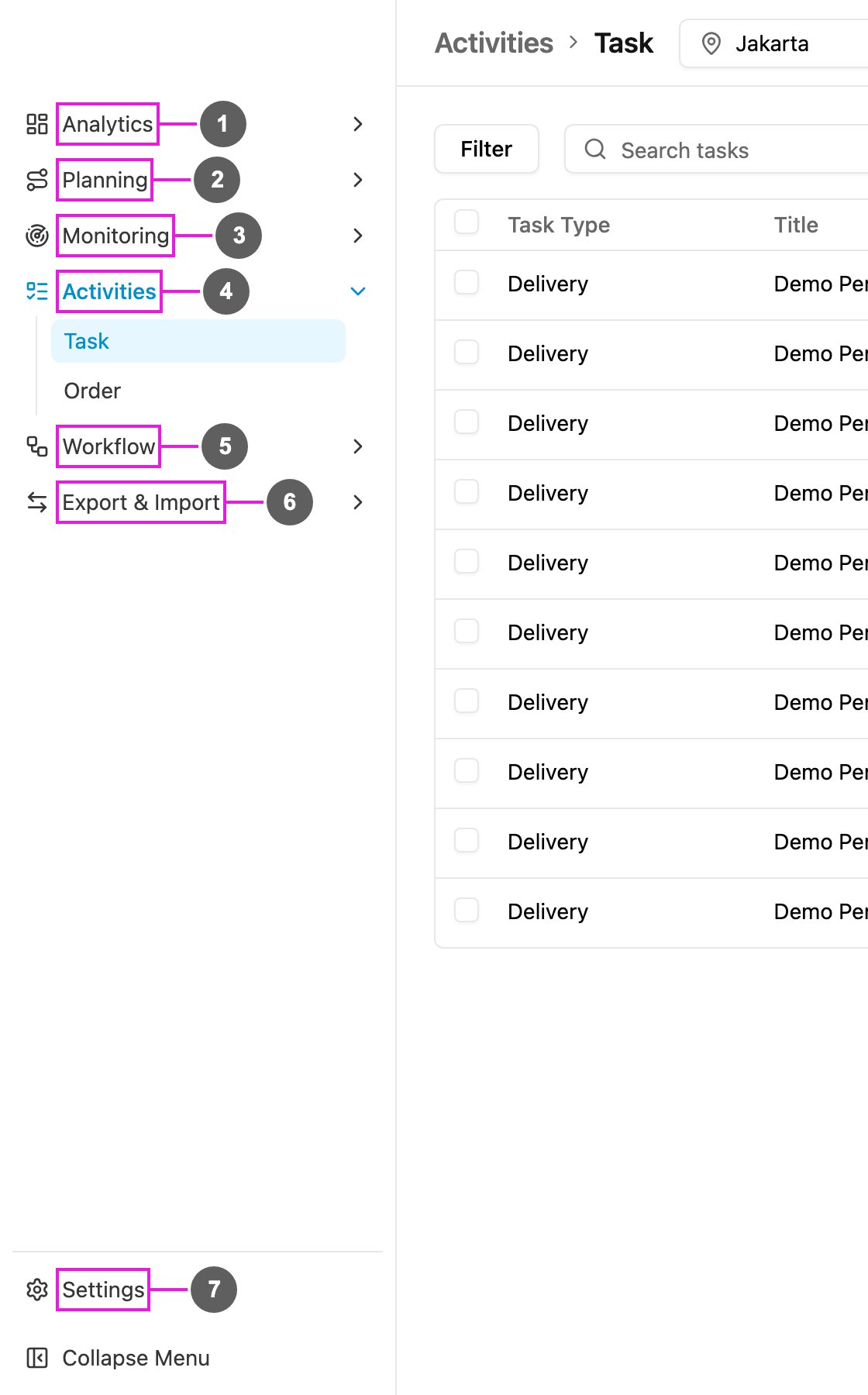
1. **Analytics**: dashboards and Insight.
2. **Planning**: Routing (Visit, Configuration, Result) and Schedule (Task, Routing).
3. **Monitoring**: Tracking, Alert and Chat.
4. **Activities**: Task (with Gallery) and Order.
5. **Workflow**: Data Type, Data Source, Task Type, Order Type and Automation.
6. **Export & Import**: Export and Import.
7. **Settings**: users, roles, hubs, monitoring settings and extensions.
## Where did my page go?
Old links and bookmarks still work: they open the page in its new place.
| Before | Now | What changed |
| - | - | - |
| Dashboard › Task | Analytics › Dashboard | The fixed task dashboard is replaced by dashboards you build yourself. The old view is available as the "Default Dashboard" template. |
| Dashboard › AI Insight | Analytics › Insight | Now a visible menu with a chat you can ask in plain language. |
| Route › Visit | Planning › Routing › Visit | Same page, new place. |
| Route › Configuration | Planning › Routing › Configuration | Vehicles are now managed here. |
| Route › Result | Planning › Routing › Result | Adds a Summary tab. |
| Task › Schedule | Planning › Schedule › Task | Adds a preview of the upcoming runs. |
| *(new)* | Planning › Schedule › Routing | Run route planning on a repeating schedule. |
| Task › Tracking | Monitoring › Tracking | Updates live, and chat with drivers happens here. |
| *(new)* | Monitoring › Alert | A history of every alert raised for your drivers. |
| Chat | Monitoring › Chat | Back in the menu, with an unread badge. |
| Task › Task | Activities › Task | Opens first after you sign in. |
| Task › Gallery | Activities › Task › Gallery | Opened from the Tasks / Gallery switch beside the task search. |
| Task › Geofence | Settings › Geofence | Moved to the new Monitoring group in Settings. |
| Data › Type | Workflow › Data Type | Renamed. |
| Data › Data Source | Workflow › Data Source | Renamed group. |
| Flow › Flow | Workflow › Task Type | "Flow" is now called **Task Type** everywhere. |
| Flow › Workflow | Workflow › Task Type › Workflow | Removed from the menu; existing workflows keep working. |
| Flow › Automation | Workflow › Automation | Same page, new place. |
| Import & Export › Data Export | Export & Import › Export | Renamed; Export now comes first. |
| Import & Export › Data Import | Export & Import › Import | Renamed, and now imports tasks as well as data source records. |
| Setting | Settings | Opens its own menu, grouped into Users & Access, Workspace, Monitoring, Extensions and Other. |
| Help links at the bottom of the menu | Help button in the top bar | Documentation, the field app download and contact links moved to the **?** button. |
| Release notes | Notifications bell | Shown as a news tab in the bell. |
## New in this version
* Build your own **dashboards** from widgets: numbers, line, bar and donut charts, tables, text, banners and a heat map.
* Start from a **template** or a blank page, rearrange and resize widgets, and undo or redo changes.
* Filter a dashboard by time range, several hubs at once, task type and user.
* **Share** a dashboard with chosen roles.
* **Insight**: ask about your operations in plain language, keep a history of your conversations and rate each answer.
* **Report**: save a report on tasks or data source records with the columns you choose, run it for a date range, and export it. See [Report](/pages/analytics/report/introduction).
* The **Visit** map shows your geotag areas with how many visits fall in each.
* **Vehicles** are added, edited and removed in Configuration, together with the rest of the routing settings.
* **Result** has a new **Summary** tab and stays fast with very large fleets.
* **Task schedules** show a preview of when the next tasks will be created.
* **Routing Schedule**: run route optimization automatically on a repeating schedule. See [Routing Schedule](/pages/planning/schedule/routing-schedule/introduction).
* **Visit** is redesigned: a full-width table with a filter-first toolbar, the map in its own window, and an edit dialog with an explicit Save.
* **Configuration** saves each change as you make it, each section explains itself, and vehicles can be imported from a spreadsheet.
* **Result** shows hub names and addresses on the start and return stops, with separate ETA and ETD.
* **Tracking** updates live instead of every few minutes.
* **Chat** with a driver and **broadcast** a message to many drivers straight from Tracking.
* The location source filter has an **All** option.
* **Alert** keeps a history of geofence, idle, lateness and route deviation alerts, with a detail view for each one.
* Emergency (panic) alerts appear on screen wherever you are, in the notifications bell and as a pin on the Tracking map.
* Task filters are kept in the page address, so a filtered list can be bookmarked or shared.
* Columns can be resized as well as shown, hidden and reordered.
* **Share to vendor**: share one or many tasks with a vendor and revoke access later.
* **Do Task on the web** uses a built-in form instead of an embedded copy of the field app.
* **Order**: create, import and follow orders step by step. See [Order](/pages/activities/order/introduction).
* **Data types** can link to each other, so a record can point to records of another type.
* **Task type version history** lists what changed between versions: fields added, edited, removed or moved.
* The task type builder warns you before you leave with unsaved changes.
* **Build with AI** retries automatically when the first draft has errors.
* **Order Type**: design how orders move from step to step, with a guided tutorial. See [Order Type](/pages/workflow/order-type/introduction).
* **Import from V3**: move or copy a data type from the previous version, with or without its records. See [Import from V3](/pages/workflow/data-type/import-from-v3).
* **Data source search** matches every field of a record.
* **Import** handles tasks as well as data source records.
* Imports have a **column mapping** step, saved mapping presets, a preview and a list of required fields.
* A separate Settings menu, grouped by purpose.
* **Alert Setting**: turn each alert type and its notification on or off.
* **Geofence**: search for an address and draw your own polygon.
* **SMS gateway**: send a test message before you save.
* **Custom Module**: add pages built for you inside the app, placed as a menu or a submenu.
* **Add-ons** has its own menu entry.
* Users and hubs can carry extra fields you define.
* The getting-started tutorial opens as a dialog.
* **Change Password** shows how strong the new password is.
## Changed behaviour
| Area | Before | Now |
| - | - | - |
| Hub picker | Always shown in the top bar | Hidden on pages that cover the whole organization (Task Type, Automation, Permission, Hub, Organization, Custom Module, Trash) and on Analytics, which has its own hub filter |
| Task type builder | Usable on any screen size | Needs a screen at least 768 pixels wide |
| Task list | Separate tabs for regular, subflow and activity tasks | One table, or cards on a phone |
| Data type fields | Range field types available | Range field types are gone; link (relation) fields are new |
| Searchable data type fields | Any field could be searchable | Searchable applies to link fields only; the Data Source search already looks in every field |
| Routing configuration | Changes saved with a Save button | Each change saves on its own |
| Role options for field users | One MFA method to pick | Each MFA method is its own switch |
| Switching organization | Opens the Task page in the new organization | Reloads the page you're on in the new organization |
| Emergency alert window | Comes back after a page reload until resolved | Closing it marks it as read, so it doesn't come back |
| Accurate integration | Customer and branch from the Sales Order were optional | Always taken from the Sales Order the document came from |
| Help menu | At the bottom of the left menu | The **?** button in the top bar: product and API documentation, field app download, the assistant and WhatsApp. The Feedback form is gone. |
## Removed
These features are not in the new version. Some of them are planned to return; the list will be updated when they do.
| Feature | Notes |
| - | - |
| Activity tasks | Creating and viewing activities from the New menu on the Task page was dropped. Existing activity tasks still show in the list. |
| Geofence overlay on the Tracking map | Geofences and entry/leave events are not drawn on the Tracking map. Geofence alerts are listed in Monitoring › Alert. |
| External data source | You can no longer connect a new data type to an external address. Existing external data types keep their settings. |
| AI Insight reports | The scheduled report (summary, findings, recommended actions, PDF export) and its context settings are not available. Insight answers questions in a chat instead. |
| In-app feedback survey | The Feedback form and survey are not available. |
| Workflow in the menu | The Workflow page is no longer in the menu. |
| Start and Finish icons on the Tracking map | The trip start and end markers are not drawn on the map. |
| ETA tooltip on the Tracking map | Hovering an ongoing task no longer shows its ETA. The planned and late times are on the task card. |
| Buttons on the emergency alert window | **Mark resolved**, **Chat Driver** and **WhatsApp** are gone. Open the alert with **View in Tracking** and resolve it in Monitoring › Alert. |
| Restoring from Trash | Trash lists deleted items so you can look at them; it can't restore or permanently delete them. |
| Editing an Accurate rule | Add a new rule and delete the old one instead. |
| Accurate serial-number setup | Picking serial numbers from stock can't be set up on the screen; contact support. |
| Add-ons without a new version | Discord Notification, Invoice Generator, Sales Target and Transport Vendor Management are not available. |
This documentation is built and hosted on [Mintlify](https://mintlify.com), a developer documentation platform.