> ## Documentation Index
> Fetch the complete documentation index at: https://docsv4.mile.app/llms.txt
> Use this file to discover all available pages before exploring further.
# Integration
> Connect your sign-in directory, your own SMS provider or your Accurate accounting to the app.
**Settings › Integration** connects the app to services your organization already uses. Each service has its own card, and each card connects, edits and disconnects on its own.
Required permission:
* View integration
* Create integration (to connect a service)
* Edit integration (to change a connected service)
* Delete integration (to disconnect a service)
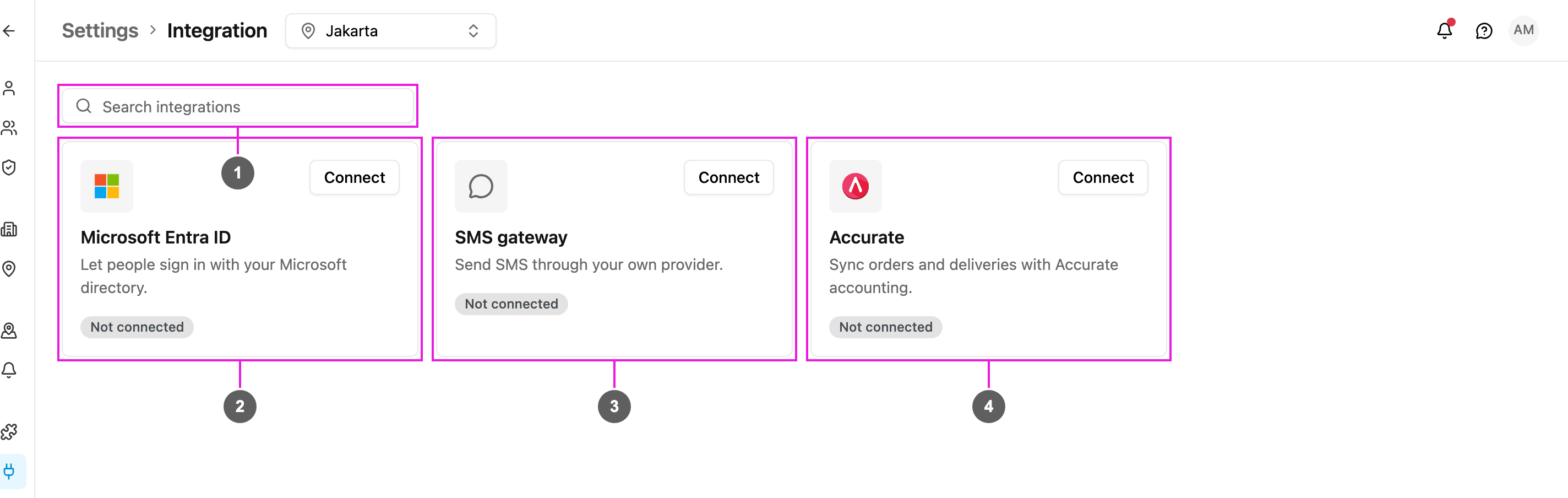
Open **Settings › Integration**.
1. **Search integrations**: type part of a name or description to narrow the cards. If nothing matches you see *Nothing matches that*; clear the search to bring every card back.
2. **Microsoft Entra ID**: people sign in with your Microsoft directory. See [Microsoft Entra ID SSO](/pages/settings/integration/entra-id-sso).
3. **SMS gateway**: the app sends SMS through your own provider instead of the built-in one. See [SMS Gateway](/pages/settings/integration/sms-gateway).
4. **Accurate**: Sales Orders in Accurate become tasks, and finished tasks push Delivery Orders back. See [Accurate](/pages/settings/integration/accurate).
## Reading a card
Each card shows the service, a one-line description, a status badge and its buttons.
| Status | Buttons | Meaning |
| - | - | - |
| **Not connected** | **Connect** | Nothing is set up yet. |
| **Connected** | **Edit**, **Disconnect** | The service is working. Accurate shows **Manage rules** instead of **Edit**. |
| **Connected** | **Reconnect**, **Disconnect** | Accurate only: the connection still exists but needs to be authorized again. See [Reconnect](/pages/settings/integration/accurate#reconnect). |
Without **Create integration** you don't see **Connect** on a service that isn't set up yet. Without **Edit integration** the cards are read-only: you can see what's connected but not change it.
**SMS gateway** and **Accurate** are offered to selected accounts only. If you don't see their cards and need one of them, contact support.
## Disconnect a service
Required permission:
* View integration
* Delete integration
Click **Disconnect** on the card. A confirmation asks, for example, *Disconnect Accurate?* and warns that the connection stops working immediately. Click **Disconnect** to confirm. You can connect the service again later.
What disconnecting keeps differs per service:
* **Microsoft Entra ID**: people can no longer sign in with Microsoft. Their accounts and passwords stay.
* **SMS gateway**: SMS goes back to the built-in provider, and automation SMS uses credit again.
* **Accurate**: your sync rules are kept and paused. See [Disconnect](/pages/settings/integration/accurate#disconnect).
This documentation is built and hosted on [Mintlify](https://mintlify.com), a developer documentation platform.