> ## Documentation Index
> Fetch the complete documentation index at: https://docsv4.mile.app/llms.txt
> Use this file to discover all available pages before exploring further.
# Summary
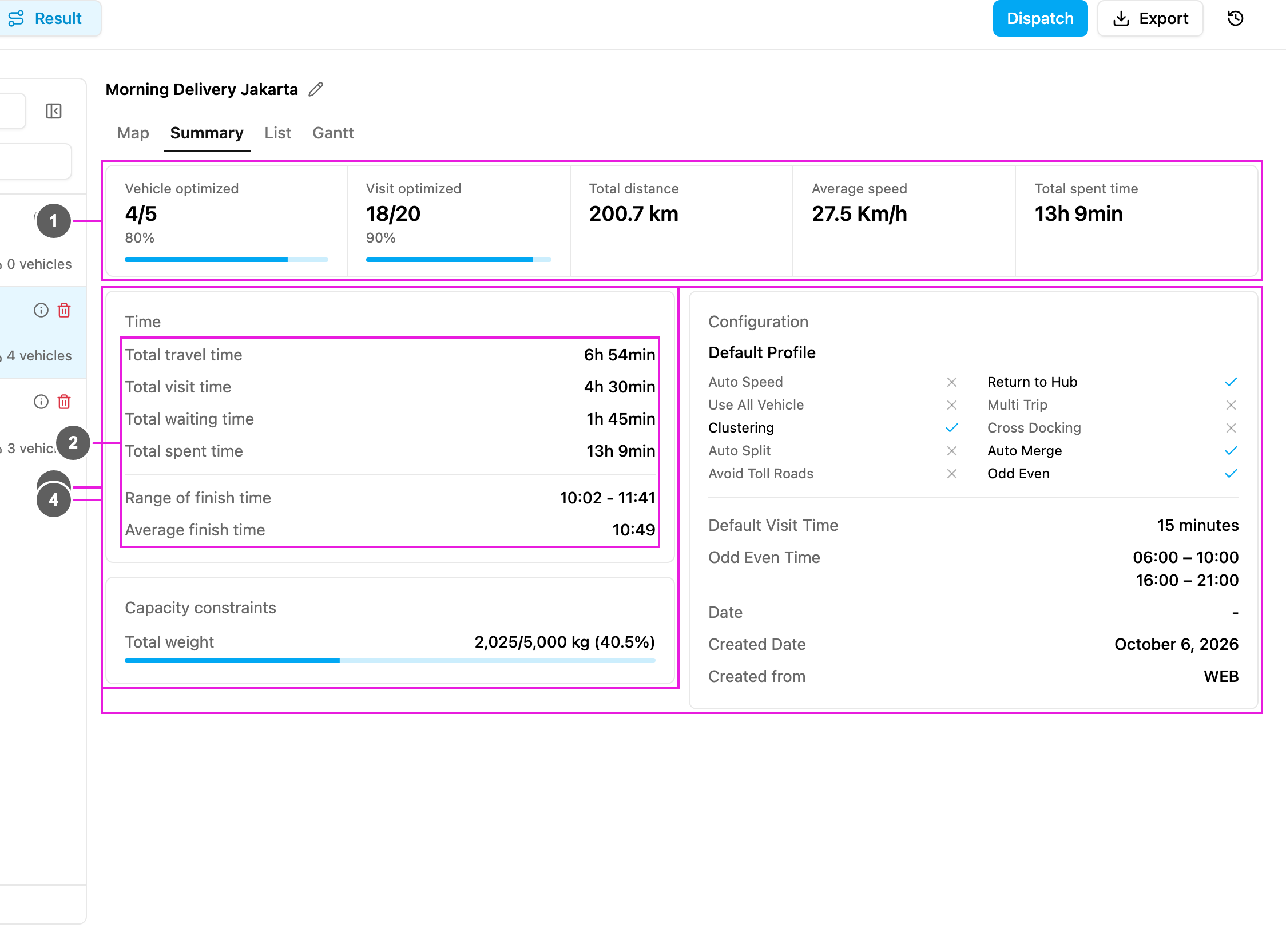
> Totals for the whole result: vehicles, visits, distance, time, capacity and configuration.
Open a result and pick **Summary** to see the totals of the whole optimization.
Required permission:
* View result
1. **Vehicles and visits**: how much of the fleet and of the visits the result uses.
2. **Time**: the time totals of all used vehicles.
3. **Capacity constraints**: how much capacity is used.
4. **Configuration**: the settings the optimization used.
## Vehicles and visits
| Field | Meaning | Example |
| - | - | - |
| **Vehicle optimized** | Vehicles with visits out of the vehicles sent to the optimization. | **4/5**, 80% |
| **Visit optimized** | Visits that were routed out of all visits. | **18/20**, 90% |
| **Total distance** | The distance driven by all used vehicles. | **200.7 km** |
| **Average speed** | The average speed of the used vehicles. Shows **Auto Speed** when the configuration uses Auto Speed. | **27.5 Km/h** |
| **Total spent time** | The total time of all used vehicles. | **13h 9min** |
## Time
| Field | Meaning | Example |
| - | - | - |
| **Total travel time** | Time all used vehicles spend driving. | **6h 54min** |
| **Total visit time** | Time spent at the visits, for example handing over or unloading. | **4h 30min** |
| **Total waiting time** | Time vehicles wait before they can serve a visit, for example until a store opens. It comes from the visits' **Open Time**. | **1h 45min** |
| **Total spent time** | Travel + visit + waiting time. | **13h 9min** |
| **Range of finish time** | The earliest and the latest time a vehicle finishes. | **10:02 – 11:41** |
| **Average finish time** | The average time the vehicles finish. | **10:49** |
## Capacity constraints
One line per capacity constraint of the configuration, for example **Total weight 2,025/5,000 kg (40.5%)**: 2,025 kg is planned out of the 5,000 kg the used vehicles can carry together. **No capacity constraints** shows when the configuration has none.
## Configuration
The settings used for this optimization: the profile name (for example **Default Profile**), then a check mark or a cross for **Auto Speed**, **Use All Vehicle**, **Clustering**, **Auto Split**, **Avoid Toll Roads**, **Return to Hub**, **Multi Trip**, **Cross Docking**, **Auto Merge** and **Odd Even**.
Below that:
* **Default Visit Time**, for example **15 minutes**.
* **Odd Even Time**: the odd-even windows, when Odd Even is on.
* **Date**: the routing date picked on the Visit page, when Odd Even is on.
* **Created Date**: when the result was created.
* **Created from**: where the optimization was started, for example **WEB**.
You can also see the configuration from the result list: hover the info icon on a result card (**Configuration used**).
This documentation is built and hosted on [Mintlify](https://mintlify.com), a developer documentation platform.