> ## Documentation Index
> Fetch the complete documentation index at: https://docsv4.mile.app/llms.txt
> Use this file to discover all available pages before exploring further.
# Use All Vehicle
> Make sure every selected vehicle gets at least one trip.
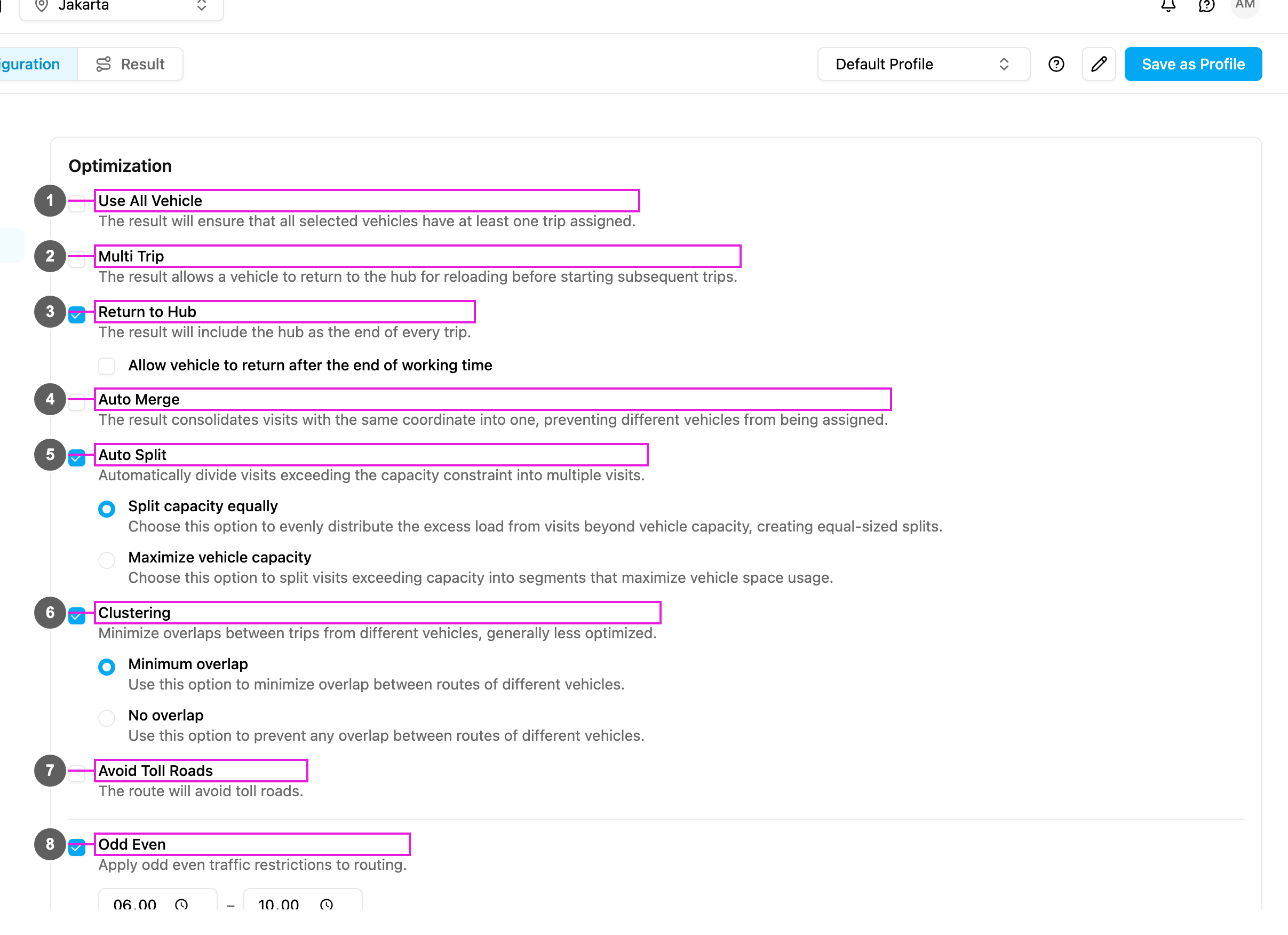
By default the optimization uses as few vehicles as possible to serve all visits, so some vehicles may get nothing while others do a lot. With **Use All Vehicle** on, the optimization spreads the work so that **every selected vehicle gets at least one trip**.
* Every selected vehicle has at least one trip.
* The work is spread more evenly across the fleet.
* Useful when you want to use your whole fleet.
Required permission:
* View configuration
* Edit configuration
## Turning it on
1. Open **Planning › Routing › Configuration** and go to **Optimization**.
2. Tick **Use All Vehicle** (item 1 in the picture).
The change is saved as soon as you make it.
If your plan doesn't include Use All Vehicle, ticking it shows **Upgrade to use more** and the box stays unticked.
## How it works
| | Without Use All Vehicle (default) | With Use All Vehicle |
| - | - | - |
| Goal | Use the fewest vehicles possible. | Spread the work over all selected vehicles. |
| Result | Some vehicles may stay unused. | Every vehicle gets at least one trip. |
| When | Keeping costs low matters most. | Using the whole fleet matters most. |
| Example: 5 vehicles, 20 visits | 3 vehicles get trips, 2 stay unused. | All 5 vehicles get trips, for example 4 visits each. |
## Use cases
**Fixed fleet**: 10 drivers report for work every day and each one should get deliveries. Turn on Use All Vehicle and select the 10 vehicles: every driver gets a route and nobody is idle.
**Fair workload**: a distribution center wants to spread deliveries fairly between drivers. Turn on Use All Vehicle, and [Multi Trip](/pages/planning/routing/configuration/multi-trip) if needed for balance: work is spread over all drivers instead of a few.
**Rented vehicles**: company policy says every rented vehicle must be used each day. Turn on Use All Vehicle, with [Return to Hub](/pages/planning/routing/configuration/return-to-hub) for a clear end point: every rented vehicle gets a route.
**Training new drivers**: several trainees need on-the-job practice. With Use All Vehicle each driver, trainees included, gets a route, and routes are naturally shorter.
## When to use it
**Use it when**:
* all drivers and vehicles are available and should work,
* a fair workload matters for the team,
* company policy requires the full fleet,
* your vehicle costs are fixed (rentals, salaries),
* trainees need routes,
* you need coverage across different areas.
**Avoid it when**:
* keeping costs low is the main goal,
* you have more vehicles than you need,
* some vehicles are on standby,
* fewer vehicles can serve the visits well,
* you want to keep vehicles free for urgent requests.
It works together with [Multi Trip](/pages/planning/routing/configuration/multi-trip), [Return to Hub](/pages/planning/routing/configuration/return-to-hub), [Auto Merge](/pages/planning/routing/configuration/auto-merge) and [Clustering](/pages/planning/routing/configuration/clustering) (to give each vehicle its own territory).
## Frequently asked questions
**Does it always make the total distance longer?**
Usually, though not always. Forcing every vehicle to work can make each route shorter but the total longer than a solution with fewer vehicles.
**What if I have more vehicles than visits?**
Each visit goes to a different vehicle and the rest stay unused: with 5 vehicles and 3 visits, 3 vehicles get one visit each. A trip cannot be made without visits.
**Does it work with capacity constraints?**
Yes. Weight, volume and other capacities are still respected.
**Does every vehicle get the same amount of work?**
No. It only guarantees at least one trip per vehicle. The rest depends on locations, time windows and capacity.
**What about vehicle tags?**
Tags are still enforced. A vehicle whose tags match no visit may still get nothing.
**How do I see which vehicles got nothing?**
The [result](/pages/planning/routing/result/summary) shows the used vehicles out of the total, and each vehicle's trips.
This documentation is built and hosted on [Mintlify](https://mintlify.com), a developer documentation platform.