> ## Documentation Index
> Fetch the complete documentation index at: https://docsv4.mile.app/llms.txt
> Use this file to discover all available pages before exploring further.
# Return to Hub
> End every trip back at the hub.
By default a route ends at its last visit. With **Return to Hub** on, every trip ends back at the hub, so you know where each vehicle finishes and when it is back.
* Vehicles return to the hub at the end of each trip.
* Routes have a clear end point for your operations.
* [Multi Trip](/pages/planning/routing/configuration/multi-trip) needs it.
* An extra option, **Allow vehicle to return after the end of working time**, lets the drive back go past the working hours.
Required permission:
* View configuration
* Edit configuration
## Turning it on
1. Open **Planning › Routing › Configuration** and go to **Optimization**.
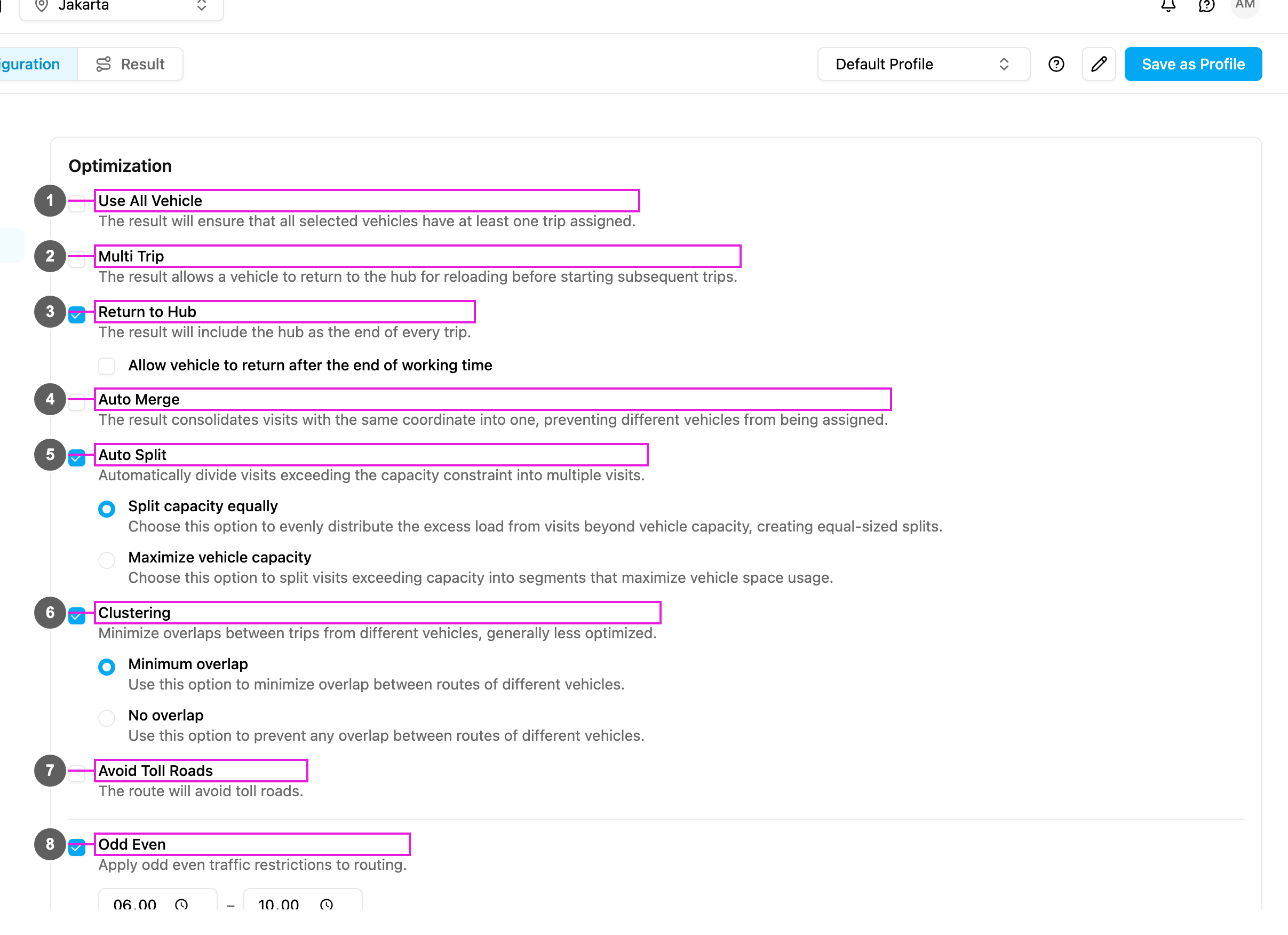
2. Tick **Return to Hub** (item 3 in the picture).
3. If you need it, tick **Allow vehicle to return after the end of working time** under it.
The change is saved as soon as you make it.
Turning on Multi Trip also turns on Return to Hub, because vehicles must go back to the hub to reload between trips.
## Options
**Return to Hub**: every route ends at the hub, wherever the last visit is.
**Allow vehicle to return after the end of working time**: **The vehicle may return to the hub once its working hours are over.**
* **Ticked**: every visit is still served inside the working hours, but the drive back to the hub may end after them.
* **Not ticked** (default): the whole route, including the drive back to the hub, must fit inside the working hours.
## How it works
| | Without Return to Hub (default) | With Return to Hub |
| - | - | - |
| Route ends at | The last visit. | The hub. |
| Distance | Only the visits. | Includes the drive back. |
| Example | Hub → Visit 1 → Visit 2 → Visit 3. The driver finishes at visit 3. | Hub → Visit 1 → Visit 2 → Visit 3 → Hub. The vehicle is ready for the next dispatch. |
## Use cases
**Central fleet**: vehicles are maintained and dispatched from one hub. With Return to Hub every vehicle comes back each day for inspection, refuelling and preparation for the next day.
**Driver commute**: drivers leave their own vehicles at the hub. They start and end their shift in the same place.
**Multi-trip operations**: vehicles make several rounds a day and reload at the hub in between. Return to Hub is turned on with [Multi Trip](/pages/planning/routing/configuration/multi-trip).
**Stock and cash**: drivers must count stock and deposit cash at the end of the day. Every driver ends at the hub.
**Busy seasons**: the drive back might run past normal hours. Tick **Allow vehicle to return after the end of working time**: all visits are on time, and the drive back is flexible.
## When to use it
**Use it when**:
* vehicles are parked and maintained at the hub,
* drivers start and end at the same place,
* you plan multiple trips,
* end-of-day procedures happen at the hub,
* security rules require vehicles to come back,
* fuel and maintenance are at the hub.
**Avoid it when**:
* the shortest distance matters most,
* vehicles are kept at different places,
* the next day starts where the previous day ended,
* the drive back adds a lot of cost.
**Allow vehicle to return after the end of working time**: tick it when finishing every visit matters more than strict hours and some overtime is acceptable. Leave it off when working hours must be respected strictly, for example because of labor rules.
## Return to Hub and Multi Trip
| Action | What happens |
| - | - |
| Turn on Multi Trip | Return to Hub is turned on too. |
| Turn off Return to Hub | Multi Trip and Return after working time are turned off too. |
| Turn on Return to Hub | Multi Trip stays as it is. |
Return to Hub also works with [Use All Vehicle](/pages/planning/routing/configuration/use-all-vehicle), [Clustering](/pages/planning/routing/configuration/clustering) (expect longer drives back) and [capacity constraints](/pages/planning/routing/configuration/capacity-constraint) (to reload).
## Frequently asked questions
**How much distance does it add?**
It depends on how far the last visit is from the hub.
**Can some vehicles return and others not?**
No. The setting applies to every vehicle of the optimization.
**Does it respect time windows?**
Yes. The drive back happens after the last visit, and every visit stays inside its open time.
**What about the working time?**
Without **Allow vehicle to return after the end of working time**, the vehicle must be back at the hub before its working time ends. For example, with working time 08:00 – 17:00 the vehicle is routed to be back before 17:00.
This documentation is built and hosted on [Mintlify](https://mintlify.com), a developer documentation platform.